Swash Brushes for Illustrator: Realistic Watercolor Vector Art
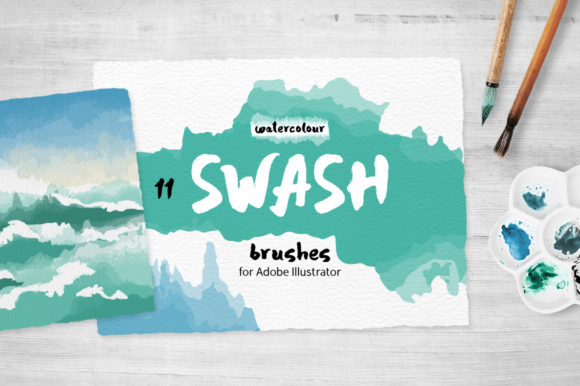
In the world of digital design, achieving an organic, handcrafted feel can be a challenge. We often rely on complex effects or raster images to mimic the nuance of physical media. This is where Swash Brushes for Illustrator changes the game. This collection isn't just another set of generic shapes; it's a meticulously crafted toolkit of 11 art brushes based on real, hand-painted watercolor strokes. The result is a set of vector assets that breathe with a natural, fluid energy, perfect for adding a human touch to your digital projects.
The Anatomy of a Natural Stroke
What makes these swash brushes stand out is their commitment to realism. Unlike brushes that rely on Illustrator's effects or blending modes to simulate texture, these are pure vectors. Each brush is built from four transparent gradations of a stroke color, allowing it to interact seamlessly with any background—light, dark, or textured. This method captures the subtle variations in pressure and pigment load you'd see from an actual brush, creating strokes that feel genuinely detailed and alive. They are, in essence, a premium font for your visual elements, designed for impact and authenticity.
The personality of these brushes is one of elegant imperfection. They carry the slight wobble and organic taper of a real artist's hand. This makes them incredibly versatile for projects that need to convey warmth, creativity, and approachability. Think of them as a script font or handwritten font equivalent for graphic elements. A single swash can act as a dynamic underline for a headline, a decorative flourish on a web design banner, or a foundational shape for an abstract background. Their style is fluid and expressive, making them ideal for logo design, packaging design, and editorial design where a personal touch is paramount.
Practical Applications for Modern Creators
For designers, entrepreneurs, and content creators, the real value of an asset lies in its utility. Swash Brushes for Illustrator are built for the modern creative workflow. Because they are vector-based, they scale to any size without losing quality, making them perfect for everything from a small social media icon to a massive printed banner. This scalability is crucial for maintaining a consistent brand identity across all touchpoints.
- Branding and Marketing: Use a bold swash as a background texture for a hero image, or weave smaller strokes into social media graphics to create a cohesive, artistic feed. They can add a layer of sophistication to a brand that wants to feel both professional and personal.
- Digital and Print Design: In editorial design, these brushes can create dynamic pull quotes or section dividers. For packaging design, they can form the basis of beautiful, artisanal label art. In web design, they can guide the user's eye and break up monotonous layouts.
- Personal Projects: Hobbyists and crafters can use them to create unique art prints, custom stationery, or digital invitations. The included JPG and PNG files make them accessible even if you're not an Illustrator expert.
When integrating these brushes into your work, think about visual hierarchy. A large, sweeping swash can draw immediate attention, while smaller, more delicate strokes can support a headline or body of text. The key is to use them with intention. They are a powerful design asset, but like any creative font, their impact depends on the context. Pair them with clean, modern sans serif font families for a striking contrast, or with a classic serif font to enhance a traditional feel. Experimentation is part of the process.
Getting Started and Making the Most of Your Brushes
Your purchase provides a robust set of files designed for flexibility. You receive the core vector AI CS5 file, an EPS file for broader compatibility, and SVG files for web use. The inclusion of individual SVG brushes is a thoughtful touch, allowing for easy integration into other design software or platforms. The high-resolution JPG and PNG files on a transparent background offer a quick solution for projects where vector editing isn't necessary.
Here’s a practical guide to implementing them:
- Evaluate Your Project's Tone: Is your project aiming for whimsical, elegant, bold, or subtle? Choose the brush stroke that matches that emotional goal. The set includes a variety of weights and shapes to fit different needs.
- Test for Readability: When using swashes as text backgrounds or underlines, always check for contrast and legibility. The transparency of the brushes helps, but ensure your text remains clear and easy to read.
- Layer for Depth: Don't be afraid to combine multiple swash brushes. Overlapping them with different opacities can create rich, complex textures and compositions that feel uniquely yours.
- Customize the Color: The brushes are set to a default stroke color, but you can change this in seconds. This allows you to match your exact brand palette, ensuring perfect integration into your existing brand identity.
Ultimately, Swash Brushes for Illustrator are more than just decorative elements. They are a bridge between the precision of digital design and the warmth of traditional art. By incorporating them into your toolkit, you gain the ability to infuse your projects with a level of organic detail and personality that is difficult to achieve otherwise. They empower you to create designs that don't just look good, but feel authentic and engaging. For the designer, marketer, or small business owner looking to elevate their visual content, this set represents a valuable and practical investment in quality modern typography and graphic art.