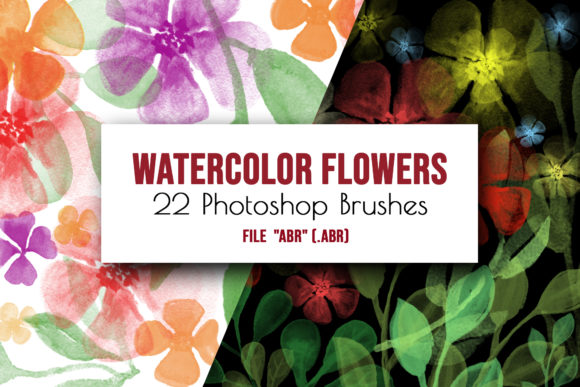
Flowers and Leaves Photoshop Brushes: A Creative Toolkit
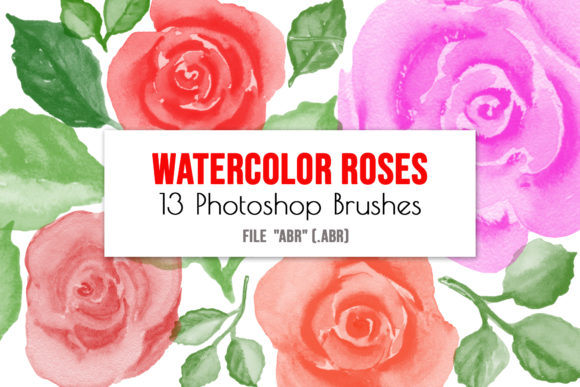
There’s a certain magic in hand-painted watercolor—the soft bleeds of pigment, the delicate texture of paper showing through, the organic imperfection that makes each stroke feel alive. Translating that magic into digital work used to require scanning, cleaning, and hours of meticulous editing. That’s precisely why these Flowers and Leaves Photoshop Brushes exist. This isn’t just another set of digital assets; it’s a curated collection of 22 hand-painted floral watercolor brushes, designed to bring an authentic, artistic touch directly into your creative workflow.
Understanding the Set's Visual Character and Appeal
Each brush in this set is a direct stamp from an original watercolor painting, capturing the subtle gradients, soft edges, and textured centers of real flowers and leaves. The visual personality is unmistakably organic, delicate, and slightly whimsical. You’ll find everything from full blooms and budding roses to sprawling vines and single, elegant leaves. The style avoids the uniformity of vector graphics, offering instead a sense of warmth and artistry that can elevate a design from sterile to soulful. This makes them particularly powerful as Photoshop floral stamps or digital brushes for projects where authenticity matters more than geometric precision.
Where These Brushes Truly Shine: Practical Applications
The real value of a resource like this lies in its versatility. As a designer or creator, you’re not just buying a tool; you’re unlocking a range of possibilities. Consider using these Flowers and Leaves Photoshop Brushes to craft wedding stationery with a personal, handcrafted feel—think invitations, save-the-dates, and thank you cards that stand out. For digital embellishments, they are perfect for adding layered accents to social media graphics, blog headers, or website banners, instantly creating visual interest without complex illustration.
For crafters and scrapbookers, they function as beautiful scrapbook accents, adding depth and a touch of nature to memory pages. Entrepreneurs and small business owners in the lifestyle, beauty, or wellness space can use them to develop a cohesive brand identity, applying the same floral motifs across packaging design, product tags, and promotional materials for instant recognition. Even in editorial design, a single, strategically placed floral element can break up text-heavy layouts and guide the reader’s eye, enhancing overall readability and visual hierarchy.
Integrating Floral Elements for Maximum Impact
Using these brushes effectively is about more than just stamping a flower onto a canvas. It’s about thoughtful integration. Start by selecting a brush that matches the scale and mood of your project. A large, sprawling branch might anchor a poster, while a small, clustered bud could perfect a business card corner. One of the greatest strengths of this set is the ability to change the brush rotation and brush size, allowing you to create unique compositions from a single source, ensuring your designs feel custom and avoid repetition.
Color is your next lever. Because these are Photoshop brushes, you can apply any color from your palette, making them adaptable to any brand identity or color scheme. Experiment with layering brushes at reduced opacity for a more subtle, watercolor-wash effect, or use them at full opacity for bold, statement pieces. For logo design or packaging design, consider using a single, stylized floral element as a central motif, ensuring it works in both color and monochrome. Always test your final design in context—how does that floral header look on a mobile screen? Is the brush detail lost when printed small on a label?
A Note on Workflow and Compatibility
This collection is optimized for Adobe Photoshop, specifically as .abr brush files. Installation is straightforward: you can either drop the watercolor_brushes.abr file into your Photoshop Brushes folder or load it directly via the Preset Manager. Once installed, they are immediately available in your brushes panel, ready to be sized, rotated, and colored. It is important to note that these were crafted for Photoshop and may not perform as expected in other graphic software. They are a premium font equivalent in the brush world—a specialized, high-quality tool designed for a specific professional environment.
When pairing these floral elements with typography, let the brushwork inform your font choices. The organic, flowing nature of the brushes pairs beautifully with script fonts or handwritten fonts for a cohesive, artisanal feel. For contrast and visual hierarchy, balance them with a clean sans serif font or a classic serif font. The key is to let the floral elements complement, not compete with, your message. Use them as accents, frames, or background textures to support your core content and create a polished, professional result that engages your audience on a tactile, emotional level.