Effortless Easter Art: Mastering Procreate Stamps
When the spring season hits, the pressure is on for designers, content creators, and small business owners to pivot their visual strategy. We often find ourselves scrambling for seasonal assets that capture the holiday spirit without looking generic or low-quality. This is where having the right design assets in your toolkit makes all the difference. If you are working within the Apple ecosystem, specifically using an iPad, you know that efficiency is just as important as aesthetics. I have spent time exploring the Easter Egg Procreate Stamps set, and I want to walk you through exactly how to leverage these tools to elevate your branding, marketing, and personal projects this season.
The Anatomy of a High-Quality Stamp Brush Set
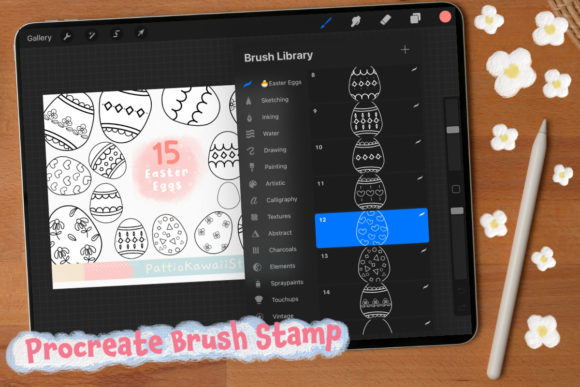
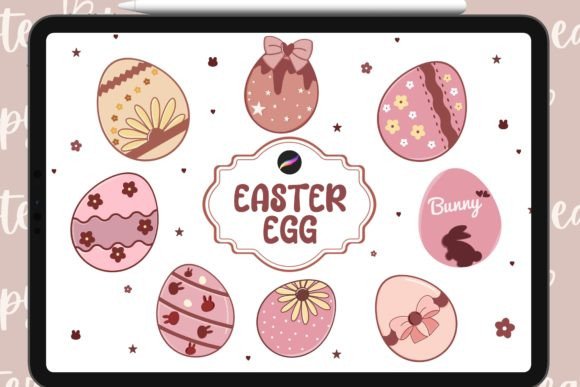
At its core, the Easter Egg Procreate Stamps collection is a curated bundle designed to save you time while maintaining a high standard of visual consistency. You are receiving a package that includes 40 distinct Easter egg stamp brushes and 2 color swatches, all packaged in the convenient .brushset format. But what does this actually mean for your workflow? It means you are not just getting images; you are getting tools that integrate seamlessly into the Procreate interface. These brushes are pressure-sensitive and optimized for the iPad’s touch capabilities, allowing for a level of control that static clipart files simply cannot provide.
The visual personality of this set is versatile. Depending on how you apply the stamps, they can feel whimsical and hand-drawn for a boutique bakery’s branding, or clean and geometric for a modern tech company’s spring sale announcement. The design of the eggs ranges from intricate patterns to bold, graphic shapes, covering a wide spectrum of styles. This variety is crucial because it allows you to maintain a cohesive brand identity across different platforms without using the exact same image repeatedly. The included color swatches are specifically chosen to complement Easter themes—think soft pastels, vibrant spring greens, and classic holiday hues—which helps in speeding up the color selection process.
Integrating Stamps into Branding and Marketing
For those of us managing brand identities or creating content for clients, consistency is the name of the game. Using Easter Egg Procreate Stamps allows you to create a unified visual language for a campaign. Imagine you are designing a social media series for a lifestyle brand. By using these stamps, you can create custom backgrounds, border elements, or focal points for Instagram posts that all share the same "hand-feel." This builds brand recognition far more effectively than using stock photos downloaded from three different websites.
In the realm of packaging design, these assets shine. If you are a crafter selling physical goods, you can design your own labels, tags, and tissue paper patterns directly in Procreate. The stamps act as high-quality design assets that scale well, ensuring your physical products look professional. For digital publishers and bloggers, these brushes are perfect for creating unique header images for articles or newsletter graphics. Instead of a generic stock image of an Easter basket, you can compose a custom scene using the egg stamps, giving your editorial design a distinct edge that captures reader attention.
Technical Application and Workflow Efficiency
It is important to understand the technical context of this product to get the most out of it. As noted, this is a digital product specifically for the Procreate app on the iPad. It requires the Apple Pencil to fully utilize the pressure sensitivity features that make these stamps feel organic rather than robotic. They will not function in Photoshop, Illustrator, or other desktop applications, so this is a tool for the mobile-first designer.
The workflow benefit here is immense. Drawing intricate Easter egg patterns by hand is time-consuming. With these stamps, you place a detailed element with a single tap, then move on to composition and coloring. This is particularly useful for logo design concepts or web design mockups where you need to quickly iterate on ideas. You can test different layouts and compositions in minutes rather than hours. This efficiency allows you to focus on the broader strategy of the design—visual hierarchy, negative space, and typography pairing—rather than getting bogged down in the rendering of individual assets.
Evaluating Fit and Practical Considerations
Before integrating any new tool into your professional kit, it is wise to evaluate how it fits your specific needs. For the Easter Egg Procreate Stamps, the primary consideration is your output. If your work is entirely digital—social media graphics, iPad sketches, and digital planning—this set is an immediate asset. However, if you are looking to create print media, remember that you will need to export your final designs from Procreate as high-resolution PDFs or TIFFs to ensure print quality.
When choosing how to use these stamps, consider your audience. For a younger demographic or a family-oriented brand, using the stamps in bright, playful arrangements works best. For a luxury brand, you might use the stamps as subtle, monochromatic watermarks or embossed effects. The versatility of the brush set allows for this range. It is also worth noting that because this is a digital delivery, you get immediate access. There is no shipping wait time, which is critical when working on tight deadlines for seasonal campaigns. However, keep in mind the sales policy: due to the digital nature of the file, sales are final. This underscores the importance of ensuring you have the compatible hardware and software before purchasing.
Enhancing Creative Projects Beyond Commerce
While the commercial applications are vast, do not overlook the value for personal projects and hobbyists. If you are a digital planner enthusiast, these stamps can decorate your April spreads, making your planning sessions more enjoyable and visually stimulating. For content creators who sell digital products, such as printable wall art or greeting cards, these brushes provide the raw material to create original artwork that you can then sell on platforms like Etsy.
The "personality" of the set lends itself well to handwritten font pairings. The organic nature of the stamp textures pairs beautifully with modern typography or script fonts, creating a balanced composition that feels both artistic and readable. Whether you are designing a simple thank-you card or a complex editorial layout, the Easter Egg Procreate Stamps offer a practical, high-quality solution to the annual challenge of seasonal design. They bridge the gap between a rough sketch and a polished final product, allowing you to deliver professional results with the agility of a mobile workflow.