Brushstrokes Imitating Stone: Raw Texture for Real Projects
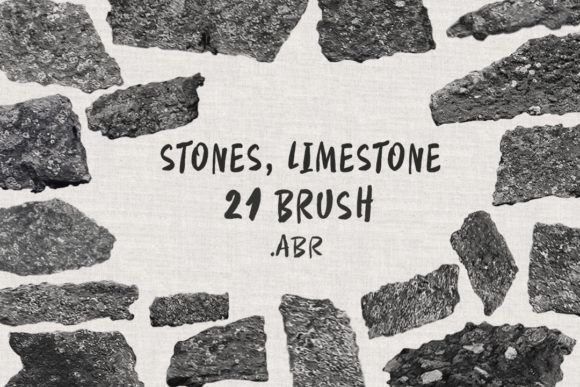
Every designer hits a wall where digital precision feels too sterile. When vector perfection makes a layout look cold or lifeless, you need an element that brings the chaos of nature back into the frame. That is exactly the gap the Brushstrokes Imitating Stone collection fills. It is a curated set of 20 realistic brushes designed specifically for Photoshop and ProCreate, packaged in a convenient .ABRZIP folder. These aren't just random scribbles; they are carefully crafted strokes that mimic the gritty, uneven, and organic texture of limestone and other natural stones.
The visual character of this collection is defined by its imperfections. When you use a standard round brush, the edge is mathematically perfect. When you use a Brushstrokes Imitating Stone brush, the edge reacts like rock. You will see microscopic fissures, grainy variations, and the kind of rough surface you would expect from a weathered cliff face or an ancient wall. The personality is rugged, raw, and grounded. It works beautifully for projects that need to convey stability, history, or an earthy connection. The sizes range from 395 to 1055 pixels, giving you enough resolution for substantial digital work without overwhelming your canvas.
Real-World Applications and Visual Strategy
Understanding where these textures fit into modern design is key to using them effectively. This isn't just about making a background look "old." It is about adding tactile depth to brand identity and editorial design. If you are working on logo design for an artisanal coffee brand, a craft brewery, or a construction firm, the stone texture adds a layer of authenticity that a flat color simply cannot achieve. It suggests that the brand is solid, established, and honest.
In packaging design, texture plays a massive role in shelf appeal. Consumers often judge products by how they imagine the item feels in their hands. By integrating these design assets into your mockups, you can simulate the look of concrete paper or textured board. This works exceptionally well for luxury items that want to convey a sense of weight and importance. The limestone effect is particularly useful for social media graphics where you need to stop the scroll. A textured background makes typography pop, especially when using a clean sans serif font or a bold display font.
For web design, texture requires a careful balance. You do not want a heavy stone background that slows down load times or makes text unreadable. Instead, use the Brushstrokes Imitating Stone brushes to create accent elements. Think about textured dividers, sidebar backgrounds, or button states that react to user interaction. These small details elevate a standard template into a custom-designed experience. Content creators and bloggers can also use these brushes to create unique headers for articles or distinct visual themes for different categories on their sites.
Color Theory and Flexibility
One of the most versatile aspects of this collection is its dependency on your color settings. The prompt notes that the color of the brush depends entirely on your selection. This is a massive advantage for marketers and entrepreneurs trying to maintain strict brand consistency. You are not locked into a specific grey limestone color. If your brand palette is deep navy, you can select that color and paint navy stone textures. If you are working on a horror-themed publishing cover, you can choose black to create dark, menacing slate effects.
This flexibility allows the Brushstrokes Imitating Stone set to function as a universal texture tool. You can create red sandstone for a southwestern vibe or white marble textures for high-end cosmetics. Because the brushes are high-resolution (up to 1055px), they hold their detail even when you apply color overlays or blending modes in Photoshop. Try setting the layer blend mode to "Multiply" or "Overlay" to see how the texture interacts with underlying colors and images. This technique is a staple in modern typography for creating "grunge" or "distressed" text effects.
Practical Integration and Workflow
For ProCreate and Photoshop users, workflow efficiency is everything. The collection is delivered as an .ABRZIP folder containing the brushes in .ABR format. This is the industry standard, ensuring a smooth installation process. Once installed, you can load the brushes into your palette and use them just like any other painting tool.
When working on creative projects, it is helpful to build a library of swatches. Since these brushes imitate stone, they work best when you build up layers. Don't try to cover a large area in one solid stroke. Instead, use short, overlapping strokes to build density. This creates a more realistic, mosaic-like appearance that looks like actual masonry rather than a stamped pattern.
For those involved in commercial fonts and type design, these brushes offer a way to create custom textures for your letterforms without scanning physical media. You can paint a texture layer over your text and use it as a clipping mask. This turns a standard serif font or script font into a rugged, weathered headline. It is a technique frequently used in poster design and music album art to create a raw, energetic feel.
Evaluating the Asset for Your Needs
Before integrating any new tool into your design assets library, you need to evaluate its fit. The Brushstrokes Imitating Stone collection is a premium font alternative in the sense that it provides high-quality, specialized textures that free tools often lack. However, it is distinct from a handwritten font or a standard creative font. It is a textural overlay tool.
If your project requires a clean, corporate look—such as a medical report or a fintech app—you might find this collection too aggressive. However, if you are targeting an audience that values craftsmanship, outdoor adventure, or vintage aesthetics, this is exactly what you need. It helps in establishing a visual hierarchy where the background texture supports the foreground content without competing with it.
Ultimately, the goal of modern typography and graphic design is to evoke emotion. Flat screens and digital vectors can sometimes feel lifeless. By using the Brushstrokes Imitating Stone brushes, you reintroduce the element of touch. You make the viewer feel the grit of the rock and the weight of the material. Whether you are a hobbyist making a digital scrapbook or a small business owner designing your next flyer, these brushes provide a bridge between the digital world and the physical one.